1 Install R/R Studio
After working through Tutorial 1, you’ll…
- know how to install R and R Studio
- understand the main set-up of R Studio
1. What are R and R Studio?
R is the programming language we’ll use to import, edit, and analyze data. R Studio is a desktop application with a graphical interface that facilitates programming with R. Basically, R Studio makes coding with R much easier!
In programming, R Studio is called an “integrated development environment” (IDE). There are other interfaces or IDEs (e.g., Positron, Visual Studio Code), but we will stick with R Studio for now.
2. How do I install R and R Studio?
2.1 Install/Update R
I don’t have R on my computer yet!
Please use Cran to install the newest version of R (version 4.3.1, “Beagle Scouts”). You’ll have to specify your operation system to download the right version:
- R for Windows
- R for Mac, please read the documentation and installation information here
I have R, but need to update it!
If you already have R installed, you just need to update it to the latest version.
Download and install the newest R version using the links above. (This won’t usually remove your old version—it installs alongside it.)
Open RStudio and go to Tools → Global Options → General.
Under R version, select the newest installed version of R.
Restart RStudio (close and reopen it) so the change takes effect.
2.2 Install/Update R Studio
I don’t have R Studio on my computer yet!
Next, install R Studio. The newest version of R Studio can be downloaded via this link.
I have R Studio, but need to update it!
If you already have R Studio on your computer, simply make sure to update it to the newest version. The easiest way to do this is via: “Help/Check for Updates” in R Studio.
3. Why should I learn R?
There are several reasons why I recommend learning R (and similar programming languages like Python) instead of menu-based programs such as SPSS.
R is free. Unlike many other statistical programs, you don’t have to buy it or depend on a university license which often expires once you leave.
R is open source. That means the source code (the “blueprint” of the software) is publicly available. On top of that, R has thousands of add-on packages - extra tools that provide specialized functions for particular tasks. Most of these packages are available through CRAN (the Comprehensive R Archive Network) and you can install them whenever you need them.
R is flexible. You can work with many different types of data and choose from a huge range of functions to import, clean, visualize, and analyze it. And if a function you need doesn’t exist yet, you can often write your own (or adapt code someone else has shared).
Programming is a valuable job skill. Knowing R (or Python) can strengthen your applications in areas like academia, market research, data science, and data journalism as many employers expect applicants to be comfortable working with code.
4. What should I know about learning R?
The learning curve (aka: break your keyboard and scream)
Learning R can feel hard—especially at the beginning. You might even think: Why the hell did I pick this course?
That’s normal. Once you understand the basics, things start to click. That’s when the fun begins and we can do the cool stuff: building visuals, scraping, and more.
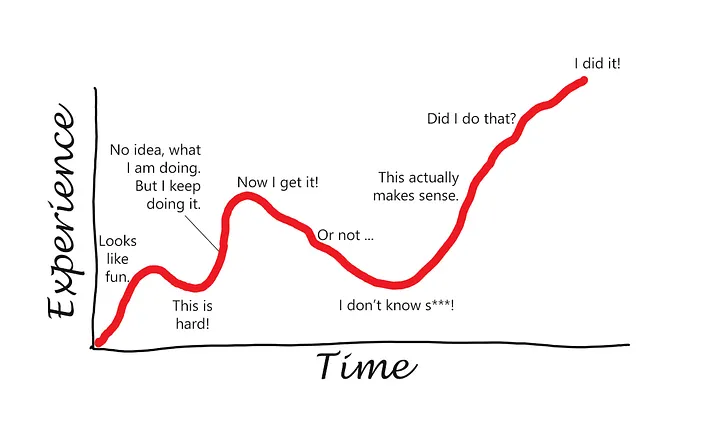
Source: Learning curve illustration originally published on Medium (Konstantin Borimechkov).
Many students experience a similar learning curve:
- Frustration phase: Errors, syntax issues, and unfamiliar concepts make progress feel slow. This stage is normal. You may want to break your keyboard and scream.
- Breakthrough: Core ideas start to make sense. Some setbacks still happen and you occasionally still forget things you thought you already knew.
- Confidence: Tasks get faster and learning new tools becomes easier. Even if you hit a problem you can’t solve right away, you know you will — it may just take some time. You’ve got it now!
Many ways to do the same thing in R
R is a full programming language. with R, you can analyze data, create graphics, automate repetitive tasks, and use thousands of add-on packages for specialized methods. That flexibility is a big advantage, but it can feel confusing at first: There are many different ways to solve the same problem in R.
You might see solutions in different tutorials that look completely different but produce the same result - that’s normal. In this course, we have one goal: make the code work and understand what it’s doing, even if it isn’t the shortest or “prettiest” solution yet. It doesn’t matter which solution you choose - as long as it it correct.
Once that feels comfortable, we’ll improve our workflow step by step: cleaner code, fewer steps, and more reusable solutions.
💡 Take-Aways
R is great! 🫶
📚 More tutorials on this
You still have questions? The following tutorials & papers can help you with that: